
By Erez Schnaider, Technical Product Marketing Manager, ClearML
In a previous blog post, we demonstrated how easy it is to leverage Arm® Neoverse™-based Graviton instances on AWS to run training workloads. In this post, we’ll explore how ClearML simplifies the management and deployment of LLM inference using llama.cpp on Arm-based instances and helps deliver up to 4x performance compared to x86 alternatives on AWS.
(Want to run llama.cpp directly? Check out this guide on setting up llama.cpp on Arm Neoverse-based AWS Graviton instances)
LLM Inference
No blog post on LLMs would be complete without a quick look at LLM inference! With the growing popularity of large language models, running these models has become increasingly accessible. Running models locally provides key benefits:
- It ensures that sensitive prompts and data aren’t leaked or reused by external providers
- It keeps costs down by eliminating per-request fees
- It enables the use of custom models fine-tuned on data tailored to specific needs
Inference frameworks like llama.cpp, vLLM, and other LLM serving engines allow users to run both off-the-shelf and fine-tuned models directly on their own hardware.
Llama.cpp is a powerful inference framework offering SOTA out-of-the-box optimizations, including support for different quantization levels, optimized memory management, and more. It’s unique in that it supports inference on CPUs as well as GPUs, with specific optimizations for AWS Graviton CPUs powered by Arm Neoverse. Running inference on CPUs can be highly cost-effective, taking advantage of the typically larger CPU RAM to support larger models.
While llama.cpp simplifies local LLM inference, additional setup is often needed to prepare it for production. Managing compute, exposing endpoints externally, managing performance dashboards, tracking usage, and implementing security and access controls are all crucial for a robust, production-ready LLM serving solution. ClearML addresses these challenges, offering a complete and transparent solution to manage, monitor, and scale LLM inference.
LLM Management Made Simple
ClearML adds a management layer on top of underlying tools and infrastructure, delivering optimized performance and ease of use — all through a single pane of glass.
To start, ClearML offers an autoscaler that automatically scales AWS, GCP, and Azure instances up or down based on actual workload demand. Simply create an autoscaler instance, then specify the AWS Graviton instance type that fits your needs, and voilà! ClearML’s autoscaler is ready to handle machine scaling in real time according to your requirements.
The next step is setting up a Llama.cpp instance, which offers a one-click Hugging Face model deployment — one click and you are done! Through the UI, you can adjust settings like model type, set a Hugging Face token, and configure the scale-to-zero timeout, making setup simple and straightforward.
Once the serving application is launched, the autoscaler detects the workload generated by the application, spins up a cloud instance based on your configuration, and deploys the model. As soon as the instance is ready, the application retrieves the specified model, runs it, and exposes an endpoint and a chat UI for immediate use.
But ClearML doesn’t stop there! Once an endpoint is live, we give you access to a management dashboard displaying all active endpoints, their status, and usage statistics, giving you complete visibility and control.
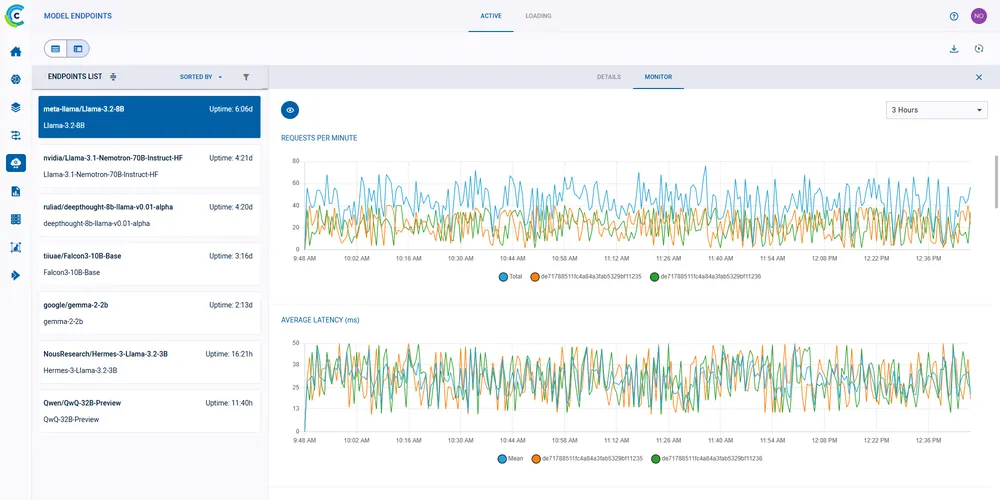
ClearML Model Endpoint Dashboard
ClearML also adds a security layer to protect models, with user authentication and RBAC rules allowing only specific users to access them. This enables administrators to track user-level statistics on model usage. In addition to the security layer, ClearML manages all network routing to and from the inference server, so you don’t have to worry about configuration or routing complexity.
Llama.cpp on Arm
As highlighted in our previous blog post, running llama.cpp on Arm-based instances is seamless, requiring no code modifications or special configurations. This is made possible by Arm Kleidi™ technology, which optimizes inference workloads on Arm-based machines and the built-in support from llama.cpp for Arm64 architecture.
For this comparison, we tested several popular quantized LLM models across different machines, using llmperf and open-source library for LLM benchmarking. We’ve benchmarked multiple models of various sizes, used repetitions per model, and averaged the results.
All tests were conducted on AWS-based instances in the us-east-1 region.
The results speak for themselves: Arm-based AWS instances delivered up to 4x better performance compared to x86 alternatives in terms of tokens per dollar.
We can see that in terms of price performance, Arm-based instances are 2-4 times better than instances based on other CPU vendors.
Conclusion
As we’ve shown you, running inference on using llama.cpp on Arm CPUs is just plug-and-play with Arm Kleidi™ technology. ClearML makes the process of spinning up an endpoint a matter of a few mouse clicks, and you can read about how to set it up here. Our experience has also demonstrated that Arm offers a superior offering in terms of price/performance compared to x86 alternatives.Interested in learning more? Read how ClearML helps teams get the most out of their compute infrastructure with hardware-, cloud-, and vendor-agnostic interoperability. If you are interested in seeing ClearML in action, please request a demo.
| Model | Instance Type | $/Hour | vCPU | RAM | Token/Sec | Tokens per $ |
| granite-7b-instruct | c8g.2xlarge | 0.31792 | 8 | 16 GiB | 14.41 | 163173 |
| granite-7b-instruct | c7i.2xlarge | 0.357 | 8 | 16 GiB | 4.48 | 45176 |
| granite-7b-instruct | c7a.2xlarge | 0.46368 | 8 | 16 GiB | 5.41 | 42003 |
| Llama 3 8b | c8g.2xlarge | 0.31792 | 8 | 16 GiB | 12.43 | 140752 |
| Llama 3 8b | c7i.2xlarge | 0.357 | 8 | 16 GiB | 3.91 | 39428 |
| Llama 3 8b | c7a.2xlarge | 0.41056 | 8 | 16 GiB | 4.56 | 39984 |
| QWEN 32B | r8g.4xlarge | 0.94256 | 16 | 128 GiB | 6.09 | 23260 |
| QWEN 32B | r7i.4xlarge | 1.0584 | 16 | 128 GiB | 3.7 | 12585 |
| QWEN 32B | r7a.4xlarge | 1.2172 | 16 | 128 GiB | 4.22 | 12481 |
| Llama 3 70b | r8g.4xlarge | 0.94256 | 16 | 128 GiB | 2.5 | 9548 |
| Llama 3 70b | r7i.4xlarge | 1.0584 | 16 | 128 GiB | 1.36 | 4625 |
| Llama 3 70b | r7a.4xlarge | 1.2172 | 16 | 128 GiB | 1.45 | 4288 |